

 最后编辑:2021-04-24
- 资源介绍
- 更新记录
- 安装教程

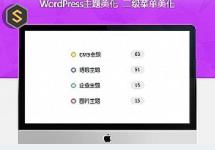
Ripro美化二级菜单增加彩色小圆圈
第一步添加CSS
复制代码添加到ripro/assets/css/diy.css里面
/***二级导航前面小圆点***/
.lanse {
box-sizing: border-box;
content: ”;
width: 12px;
height: 12px;
border-radius: 50%;
position: absolute;
top: 50%;
margin-left: 10px;
margin-top: -6px;
left: 0;
border-color: #61e1b9;
border: 3px solid #7a99f2;
}
.lvse {
box-sizing: border-box;
content: ”;
width: 12px;
height: 12px;
border-radius: 50%;
position: absolute;
top: 50%;
margin-left: 10px;
margin-top: -6px;
left: 0;
border-color: #61e1b9;
border: 3px solid #70d7cf;
}
.huangse {
box-sizing: border-box;
content: ”;
width: 12px;
height: 12px;
border-radius: 50%;
position: absolute;
top: 50%;
margin-left: 10px;
margin-top: -6px;
left: 0;
border-color: #61e1b9;
border: 3px solid #f5c745;
}
.hongse {
box-sizing: border-box;
content: ”;
width: 12px;
height: 12px;
border-radius: 50%;
position: absolute;
top: 50%;
margin-left: 10px;
margin-top: -6px;
left: 0;
border-color: #61e1b9;
border: 3px solid #f1787f;
}
/***二级导航前面小圆点结束***/
第二步在后台外观-菜单添加一下代码
<i class="hongse"></i> //这里的"hongse"对应的是上面CSS样式,一共4个样式,根据自己的爱好可以作相应的调整
猜你喜欢
-
WordPress主题:iDowns主题V1.8.3CMS模块完美适配自适应
2021-04-21 -
WordPress 多媒体库添加分类和标签支持
2021-04-26 -
WordPress主题开发者必备官方测试数据包下载和安装
2021-04-26 -
维护WordPress数据库的5种最佳做法
2021-04-26 -
get_term_link()函数
2021-04-26 -
给WordPress网站添加Javascript代码的方法
2021-04-26 -
RIPRO主题美化-用户信息展示小工具美化
2021-04-24 -
WordPress获取登录用户角色和用户资料信息
2021-04-25 -
俄罗斯大神WIN10 64位超级精简版1.9G
2021-04-25 -
田园乡村生活风WordPress主题 Pure lifestyle blog WordPress Theme
2021-04-21
-
Ripro数据转换Riplus插件
2021-04-24 -
phpstorm中文汉化破解版_集成多种插件的php开发
2021-04-25 -
Reviewer – 快速简单评论 WordPress 插件 – v3.24.0
2021-04-24 -
自动登出非活跃的WordPress用户:Inactive Logout(已汉化)
2021-04-24 -
WordPress分类/页面/文章类型等模版继承规则和自定义方法
2021-04-26 -
Kitchen – 创新设计新闻资讯博客WrdPress网站模板 – v3.1.5
2021-04-24 -
Tita 3D – 现代炫酷3D切换效果网站模板WordPress主题 – v3.3
2021-04-24 -
register_taxonomy()函数
2021-04-26 -
电影资讯采集规则:火车头采集规则全球电影资讯-豆瓣电影-2345影视大全电影电视预告
2021-04-25 -
RIPRO美化-内页添加文本阅读(朗读)功能
2021-04-25
猜你在找

常见问题FAQ
- 免费下载或者VIP会员专享资源能否直接商用?
- 本站所有资源版权均属于原作者所有,这里所提供资源均只能用于参考学习用,请勿直接商用。若由于商用引起版权纠纷,一切责任均由使用者承担。更多说明请参考 VIP介绍。
- 提示下载完但解压或打开不了?
- 找不到素材资源介绍文章里的示例图片?
- 大资源

- 2021-04-24Hi,初次和大家见面了,请多关照!
