

- 资源介绍
- 更新记录
- 安装教程

喜欢美化的同学分享一个实现游客底部提示登录,并显示登陆及第三方登录按钮的小功能
为大家提供了两款代码,一款免费的普通版,另一款二开带后台开关+js特效的版本
教程1:恰饭版本新增后台设置+前台滑动隐藏显示效果
第一步:打开主题footer.php文件,找到“<?php get_template_part( ‘parts/off-canvas’ ); ?>”,在这行代码前面增加以下代码
<?php if ( !is_user_logged_in()) :?>
<?php
$xinghai_youke = _cao(‘xinghai_youke’);
$xinghai_yk = _cao(‘xinghai_yk’);
$xinghai_yk_info = _cao(‘xinghai_info’);
?>
<div class=”zhankr_slogin cl” style=”opacity: 1;”>
<div class=”wp”>
<div class=”zhankr_slogin_info”><?php echo $xinghai_yk_info ?></div>
<?php if($xinghai_yk[‘xinghai_pt’]) : ?>
<div class=”zhankr_slogin_btn”>
<a rel=”nofollow” href=”javascript:;” class=”login-btn” title=”普通登录”><i class=”fa fa-user”></i> 账号登录</a>
</div>
<?php endif; ?>
<?php if ($xinghai_yk[‘xinghai_qq’]) : ?>
<div class=”zhankr_slogin_qq”><a href=”<?php echo esc_url(home_url(‘/oauth/qq?rurl=’)).curPageURL();?>” class=”qqbutton” rel=”nofollow”><i class=”fa fa-qq”></i> QQ登录</a></div>
<?php endif; ?>
<?php if ($xinghai_yk[‘xinghai_wechat’]) : ?>
<span class=”zhankr_slogin_line”></span>
<div class=”zhankr_slogin_wechat”><a href=”<?php echo esc_url(home_url(‘/oauth/weixin?rurl=’)).curPageURL();?>” class=”wechatbutton” rel=”nofollow”><i class=”fa fa-wechat”></i> 微信登录</a></div>
<?php endif; ?>
<?php if ($xinghai_yk[‘xinghai_weibo’]) : ?>
<span class=”zhankr_slogin_line”></span>
<div class=”zhankr_slogin_weibo”>
<a rel=”nofollow” href=”<?php echo esc_url(home_url(‘/oauth/weibo?rurl=’)).curPageURL();?>” class=”weibobutton” rel=”nofollow” ><i class=”fa fa-weibo”></i> 微博登录</a></div>
<?php endif; ?>
</div>
</div>
<?php endif; ?>
第二步:打开diy.css或者父主题的app.css,添加下面样式
/*游客提示登录*/
.site-header{
transition: All 0.5s ease-in-out;
-webkit-transition: All 0.5s ease-in-out;
-moz-transition: All 0.5s ease-in-out;
-o-transition: All 0.5s ease-in-out;
}
.zhankr_slogin_btn i.fa.fa-user{
color: #fff !important;
}
.zhankr_slogin {
position: fixed;
z-index: 99;
left: 0;
bottom: 0;
width: 100%;
padding: 25px 0;
text-align: center;
height: auto;
line-height: 45px;
background: #f9f9f9;
border-top: 1px solid #fff;
font-family: microsoft yahei;
transition: All 0.5s ease-in-out;
-webkit-transition: All 0.5s ease-in-out;
-moz-transition: All 0.5s ease-in-out;
-o-transition: All 0.5s ease-in-out;
background: rgba(2, 10, 18, .7);
}
@media (max-width:767px) {
.zhankr_slogin {
display: none
}
}
.zhankr_slogin .wp {
width: 100%;
align-content: center;
}
.zhankr_slogin_info {
display: inline-block;
font-size: 22px;
color: #fff;
letter-spacing: 2px;
height: 40px;
line-height: 40px;
font-weight: 300;
}
.zhankr_slogin_info a {
color: #3d7eff;
}
.zhankr_slogin_btn {
display: inline-block;
line-height: 40px;
height: 40px;
margin: 0 8px;
}
.zhankr_slogin_btn a {
display: block;
background: #673AB7;
color: #fff;
padding: 0 30px;
border-radius: 3px;
font-size: 16px;
border-radius: 50px;
}
.zhankr_slogin_qq .fa-qq, .zhankr_slogin_wechat .fa-wechat, .loginbutton .fa-user {
color: #fff;
margin-right: 3px;
}
.zhankr_slogin_line {
display: inline-block;
*zoom: 1;
*display: inline;
width: 1px;
height: 10px;
/*background: #f6f6f6;*/
}
.zhankr_slogin_qq {
border-radius: 10%;
display:inline-block !important;
zoom:1;
display:inline;
line-height:40px;
height:40px;
margin:0 8px;
white-space: nowrap;
}
.zhankr_slogin_qq a {
display: block;
color: #fff;
padding: 0 30px;
border-radius: 3px;
font-size: 16px;
background: #2581ff;
border-radius: 50px;
}
.zhankr_slogin_wechat{
display:inline-block;
*display:inline;
*zoom:1;
line-height:40px;
height:40px;
margin:0 8px;
white-space: nowrap;
}
.zhankr_slogin_wechat a{
display: block;
color: #fff;
padding: 0 30px;
border-radius: 3px;
font-size: 16px;
background: #2bac19;
border-radius: 50px;
}
.zhankr_slogin_weibo {
border-radius: 10%;
display:inline-block !important;
zoom:1;
display:inline;
line-height:40px;
height:40px;
margin:0 8px;
white-space: nowrap;
}
.zhankr_slogin_weibo a {
display: block;
background: #ec2546;
color: #fff;
padding: 0 30px;
border-radius: 3px;
font-size: 16px;
border-radius: 50px;
}
@media (max-width:768px) {
.zhankr_slogin {
display: none;
}
}
/*游客提示登录*/
第三步:JS添加到你任意可以被引用的js文件中即可
//底部浮动
var AnimationPlay = false;
var LayerDisplay = true;
var Win_scrollTop = jQuery(window).scrollTop();
jQuery(window).scroll(function() {
if (AnimationPlay) {
return;
}
var Win_scrollTop2 = jQuery(window).scrollTop();
if (Win_scrollTop2 > Win_scrollTop) {
if (LayerDisplay) {
LayerDisplay = false;
AnimationPlay = true;
jQuery(‘.zhankr_slogin’).stop().animate({
‘bottom’: ‘-130px’,
‘opacity’: ‘0’,
‘visibility’: ‘hidden’
}, 500, function() {
AnimationPlay = false;
});
}
} else if (Win_scrollTop2 <= Win_scrollTop) {
if (!LayerDisplay) {
LayerDisplay = true;
AnimationPlay = true;
jQuery(‘.zhankr_slogin’).stop().animate({
‘bottom’: ‘0px’,
‘opacity’: ‘1’,
‘visibility’: ‘visible’
}, 300, function() {
AnimationPlay = false;
});
}
}
Win_scrollTop = Win_scrollTop2;
});
第四步:添加功能函数到functions.php文件底部
//游客提示登录
function curPageURL()
{
$pageURL = ‘http’;
if ($_SERVER[“HTTPS”] == “on”)
{
$pageURL .= “s”;
}
$pageURL .= “://”;
$pageURL .= $_SERVER[“SERVER_NAME”] . $_SERVER[“REQUEST_URI”];
return $pageURL;
}
第五步:添加后台功能打开ripro/inc/codestar-framework/options/diy-options.php,当然也可以集成自己子主题中!
// 登录设置
CSF::createSection($prefix, array(
‘title’ => ‘登录设置’,
‘icon’ => ‘fa fa-address-card’,
‘description’ => ‘登录相关设置( 注意:<font color=”red”> “ 千万别手贱点击全部重置。 ” </font>)’,
‘fields’ => array(
// 开启登录鸭嘴动效
array(
‘id’ => ‘xinghai_login_yazui’,
‘type’ => ‘switcher’,
‘title’ => ‘开启登录鸭嘴特效’,
‘default’ => true,
),
// 开启游客提示登录
array(
‘id’ => ‘xinghai_youke’,
‘type’ => ‘switcher’,
‘title’ => ‘开启未登录提示’,
‘default’ => true,
),
// 游客登录提示标语
array(
‘id’ => ‘xinghai_info’,
‘type’ => ‘textarea’,
‘title’ => ‘未登录提示标语’,
‘default’ => ‘仅开放社交账号登录’,
‘dependency’ => array(‘xinghai_youke’, ‘==’, ‘true’),
‘help’ => ‘<br><a rel=”nofollow” href=”/vip” title=”VIP”>开通VIP</a> 享更多特权,建议使用微信登录’,
),
// 登录设置(开启游客提示登录按钮后生效)
array(
‘id’ => ‘xinghai_yk’,
‘type’ => ‘fieldset’,
‘title’ => ‘登录授权设置’,
‘fields’ => array(
array(
‘type’ => ‘notice’,
‘style’ => ‘success’,
‘content’ => ‘QQ互联官网 <a target=”_blank” href=”https://connect.qq.com/”>点击进入</a>
<br> 微信开放平台 <a target=”_blank” href=”https://open.weixin.qq.com/”>点击进入</a>
<br> 微博开发平台 <a target=”_blank” href=”https://open.weibo.com/”>点击进入</a>’,
),
// 账号登录
array(
‘id’ => ‘xinghai_pt’,
‘type’ => ‘switcher’,
‘title’ => ‘开启账号登录’,
‘default’ => true,
),
// QQ登录
array(
‘id’ => ‘xinghai_qq’,
‘type’ => ‘switcher’,
‘title’ => ‘开启QQ登录’,
‘default’ => true,
),
// 微信登录
array(
‘id’ => ‘xinghai_wechat’,
‘type’ => ‘switcher’,
‘title’ => ‘开启微信登录’,
‘default’ => true,
),
// 微博登录
array(
‘id’ => ‘xinghai_weibo’,
‘type’ => ‘switcher’,
‘title’ => ‘开启微博登录’,
‘default’ => true,
),
),
‘dependency’ => array(‘xinghai_youke’, ‘==’, ‘true’),
),
array(
‘type’ => ‘notice’,
‘style’ => ‘success’,
‘content’ => ‘友情提示:最好就使用一个触发条件,当然也可以两个一起开启,只是仅会触发全局’,
),
// 全局触发补充资料
array(
‘id’ => ‘xinghai_quanju_chufa’,
‘type’ => ‘switcher’,
‘title’ => ‘开启全局触发补充资料’,
‘default’ => true,
),
// 个人中心触发补充资料
array(
‘id’ => ‘xinghai_user_chufa’,
‘type’ => ‘switcher’,
‘title’ => ‘开启个人中心触发补充资料’,
‘default’ => true,
),
),
));
教程2:普通版本
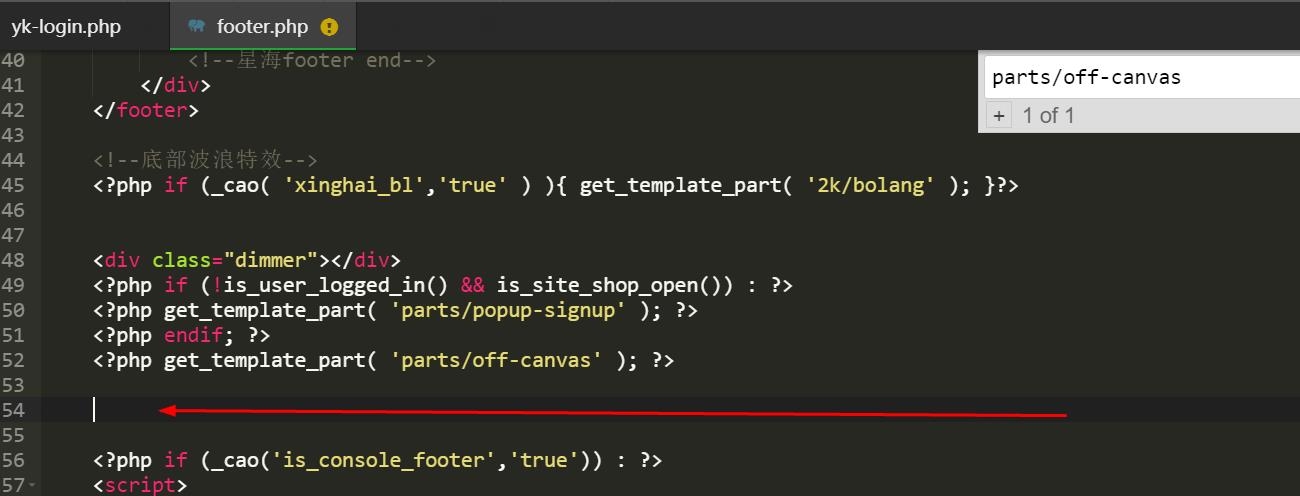
1.打开ripro目录下的footer.php文件,搜索代码 parts/off-canvas 添加代码到箭头位置
<div class=”xh_slogin cl” style=”opacity: 1;”>
<div class=”wp”>
<div class=”xh_slogin_info”>建议使用QQ登录</div>
<div class=”xh_slogin_btn”>
<a rel=”nofollow” href=”javascript:;” class=”login-btn” title=”普通登录”><i class=”fa fa-user”></i> 账号登录</a>
</div>
<div class=”xh_slogin_qq”><a href=”<?php echo esc_url(home_url(‘/oauth/qq?rurl=’)).curPageURL();?>” class=”qqbutton” rel=”nofollow”><i class=”fa fa-qq”></i> QQ登录</a></div>
<span class=”xh_slogin_line”></span>
<div class=”xh_slogin_wechat”><a href=”<?php echo esc_url(home_url(‘/oauth/weixin?rurl=’)).curPageURL();?>” class=”wechatbutton” rel=”nofollow”><i class=”fa fa-wechat”></i> 微信登录</a></div>
<span class=”xh_slogin_line”></span>
<div class=”xh_slogin_weibo”>
<a rel=”nofollow” href=”<?php echo esc_url(home_url(‘/oauth/weibo?rurl=’)).curPageURL();?>” class=”weibobutton” rel=”nofollow” ><i class=”fa fa-weibo”></i> 微博登录</a></div>
</div>
</div>
2.添加CSS
/*游客提示登录*/
.site-header{
transition: All 0.5s ease-in-out;
-webkit-transition: All 0.5s ease-in-out;
-moz-transition: All 0.5s ease-in-out;
-o-transition: All 0.5s ease-in-out;
}
.xh_slogin_btn i.fa.fa-user{
color: #fff !important;
}
.xh_slogin {
position: fixed;
z-index: 99;
left: 0;
bottom: 0;
width: 100%;
padding: 25px 0;
text-align: center;
height: auto;
line-height: 45px;
background: #f9f9f9;
border-top: 1px solid #fff;
font-family: microsoft yahei;
transition: All 0.5s ease-in-out;
-webkit-transition: All 0.5s ease-in-out;
-moz-transition: All 0.5s ease-in-out;
-o-transition: All 0.5s ease-in-out;
background: rgba(2, 10, 18, .7);
}
@media (max-width:767px) {
.xh_slogin {
display: none
}
}
.xh_slogin .wp {
width: 100%;
align-content: center;
}
.xh_slogin_info {
display: inline-block;
font-size: 22px;
color: #fff;
letter-spacing: 2px;
height: 40px;
line-height: 40px;
font-weight: 300;
}
.xh_slogin_info a {
color: #3d7eff;
}
.xh_slogin_btn {
display: inline-block;
line-height: 40px;
height: 40px;
margin: 0 8px;
}
.xh_slogin_btn a {
display: block;
background: #673AB7;
color: #fff;
padding: 0 30px;
border-radius: 3px;
font-size: 16px;
border-radius: 50px;
}
.xh_slogin_qq .fa-qq, .xh_slogin_wechat .fa-wechat, .loginbutton .fa-user {
color: #fff;
margin-right: 3px;
}
.xh_slogin_line {
display: inline-block;
*zoom: 1;
*display: inline;
width: 1px;
height: 10px;
/*background: #f6f6f6;*/
}
.xh_slogin_qq {
border-radius: 10%;
display:inline-block !important;
zoom:1;
display:inline;
line-height:40px;
height:40px;
margin:0 8px;
white-space: nowrap;
}
.xh_slogin_qq a {
display: block;
color: #fff;
padding: 0 30px;
border-radius: 3px;
font-size: 16px;
background: #2581ff;
border-radius: 50px;
}
.xh_slogin_wechat{
display:inline-block;
*display:inline;
*zoom:1;
line-height:40px;
height:40px;
margin:0 8px;
white-space: nowrap;
}
.xh_slogin_wechat a{
display: block;
color: #fff;
padding: 0 30px;
border-radius: 3px;
font-size: 16px;
background: #2bac19;
border-radius: 50px;
}
.xh_slogin_weibo {
border-radius: 10%;
display:inline-block !important;
zoom:1;
display:inline;
line-height:40px;
height:40px;
margin:0 8px;
white-space: nowrap;
}
.xh_slogin_weibo a {
display: block;
background: #ec2546;
color: #fff;
padding: 0 30px;
border-radius: 3px;
font-size: 16px;
border-radius: 50px;
}
@media (max-width:768px) {
.xh_slogin {
display: none;
}
}
/*游客提示登录*/
3.添加功能函数到functions.php文件底部
//游客提示登录
function curPageURL()
{
$pageURL = ‘http’;
if ($_SERVER[“HTTPS”] == “on”)
{
$pageURL .= “s”;
}
$pageURL .= “://”;
$pageURL .= $_SERVER[“SERVER_NAME”] . $_SERVER[“REQUEST_URI”];
return $pageURL;
}
猜你喜欢
-
Adobe CC2019绿色版全家桶一键安装免激活
2021-04-25 -
WP插件个人中心美化代码erphpdown付费插件
2021-04-24 -
WordPress文章添加公众号引流模块
2021-04-25 -
wp_enqueue_style()函数
2021-04-26 -
wordpress注册账号支持中文名注册
2021-04-26 -
Windows10 x64位原版镜像5合1
2021-04-25 -
WordPress如何禁止后台编辑主题和插件
2021-04-25 -
WordPress 后台文章列表根据状态颜色高亮
2021-04-26 -
【BlackCandy-V2.0】WP导航主题黑格超大气简约网址导航网站模板
2021-04-21 -
IMGspider – WordPress图片采集抓取插件
2021-04-24
-
WordPress教程之添加用户自定义字段(user_meta)到用户资料
2021-04-25 -
独家WordPress插件-媒体文件夹WP Media folder汉化版5.37
2021-04-24 -
RIPRO主题美化-文章添加公众号引流关注模块
2021-04-25 -
WordPress不用插件实现文章AJAX点赞、文章点赞排行
2021-04-25 -
Ripro美化添加分类列表页搜索框+文本
2021-04-25 -
Olympus主题:超漂亮的国外WordPress社交主题
2021-04-24 -
WordPress如何调用指定ID文章
2021-04-24 -
【WP导航主题】黑格超大气简约网址导航网站模板
2021-04-21 -
WordPress实现文章内容登录后可见
2021-04-26 -
WordPress优化之去掉分类链接中的category
2021-04-25
猜你在找

常见问题FAQ
- 免费下载或者VIP会员专享资源能否直接商用?
- 本站所有资源版权均属于原作者所有,这里所提供资源均只能用于参考学习用,请勿直接商用。若由于商用引起版权纠纷,一切责任均由使用者承担。更多说明请参考 VIP介绍。
- 提示下载完但解压或打开不了?
- 找不到素材资源介绍文章里的示例图片?
- 大资源

- 2021-04-25Hi,初次和大家见面了,请多关照!
