

 最后编辑:2021-04-26
- 资源介绍
- 更新记录
- 安装教程

register_post_type()函数
register_post_type()函数是用于自定义文章类型的函数
语法结构
register_post_type($post_type,$args)
参数
$post_type (string) (必选) 文章类型的名称(最多20个字符) Default: 空
$args (array) (可选) 一个数组参数 Default: 空
Post Type 可以自定义的功能非常多,所以这个函数里面的 $args参数会很多。所以通常会用下面这种格式来注册,也有很多是可选项:
// 注册自定义文章形式
function custom_post_type(){
$labels = array(
‘name’ => ‘Post Type General Name’,
‘singular_name’ => ‘Post Type Singular Name’,
‘menu_name’ => ‘Post Types’,
‘name_admin_bar’ => ‘Post Type’,
‘archives’ => ‘Item Archives’,
‘attributes’ => ‘Item Attributes’,
‘parent_item_colon’ => ‘Parent Item:’,
‘all_items’ => ‘All Items’,
‘add_new_item’ => ‘Add New Item’,
‘add_new’ => ‘Add New’,
‘new_item’ => ‘New Item’,
‘edit_item’ => ‘Edit Item’,
‘update_item’ => ‘Update Item’,
‘view_item’ => ‘View Item’,
‘view_items’ => ‘View Items’,
‘search_items’ => ‘Search Item’,
‘not_found’ => ‘Not found’,
‘not_found_in_trash’ => ‘Not found in Trash’,
‘featured_image’ => ‘Featured Image’,
‘set_featured_image’ => ‘Set featured image’,
‘remove_featured_image’ => ‘Remove featured image’,
‘use_featured_image’ => ‘Use as featured image’,
‘insert_into_item’ => ‘Insert into item’,
‘uploaded_to_this_item’ => ‘Uploaded to this item’,
‘items_list’ => ‘Items list’,
‘items_list_navigation’ => ‘Items list navigation’,
‘filter_items_list’ => ‘Filter items list’
);
$args = array(
‘labels’ => $labels,
‘description’ => ‘Post Type Description’,
‘supports’ => array(‘title’,’editor’,’author’,’thumbnail’,’excerpt’,’comments’),
‘taxonomies’ => array( ‘category’, ‘post_tag’ ),
‘hierarchical’ => false,
‘public’ => true,
‘show_ui’ => true,
‘show_in_menu’ => true,
‘menu_position’ => 5,
‘menu_icon’ => ‘dashicons-cart’,
‘show_in_admin_bar’ => true,
‘show_in_nav_menus’ => true,
‘can_export’ => true,
‘has_archive’ => true,
‘exclude_from_search’ => false,
‘publicly_queryable’ => true,
‘capability_type’ => ‘page’,
);
register_post_type(‘post_type’, $args);
}
add_action(‘init’, ‘custom_post_type’);
$labels用来配置文章类型显示在后台的一些描述性文字,默认为空。(上面代码中,为了清晰所以单独拿出来创建了一个数组 $labels)
name – 文章类型的名称(英语写为复数)
singular_name – 单篇文章类型的名称(英语写为复数)
add_new – 对应“添加新的文本”
all_items – 子菜单的字符串。默认是所有帖子/所有页面。
add_new_item – “添加新帖/新页面”
edit_item – “编辑帖子/页面”
new_item – “新贴/新页”
view_item – 用于查看帖子类型归档的标签。默认是’查看帖子’/’查看页面’
search_items – 默认是搜索帖子/搜索页面
not_found – 默认是没有发现帖子/找不到页面。
not_found_in_trash – 默认是在垃圾桶中找不到帖子/在垃圾桶中找不到页面。
parent_item_colon – 此字符串不用于非分层类型。在层次结构中,默认为“父页面:”。
menu_name’ – 菜单名称,默认与`name`相同。
$args的详细参数
description – 一些简短的介绍文字
public- 用于定义publicly_queryable,exclude_from_search,show_ui,show_in_nav_menus可见的方式, 默认是false,’true 的话即为show_ui = true,public_queryable = true,exclude_from_search = false,show_in_nav_menus = true
- publicly_queryable – 可以从前台获取的变量(从url中,比如url重写),默认值:public参数的值
- exclude_from_search – 是否能够被搜索到。默认值:与public参数相反的值
- show_ui – 是否生成一个默认的管理页面,也就是是否在后台有管理页面。默认值:public参数的值
- show_in_nav_menus -是否可以在导航菜单中选择post_type。默认值:public参数的值
- show_in_menu- 是否在后台菜单项中显示,如果为ture,那么show_ui的值也必须设置为true,将会有一个顶级菜单项。 默认值:null
menu_position – 在后台菜单中的位置
- 5 – below Posts
- 10 – below Media
- 15 – below Links
- 20 – below Pages
- 25 – below comments
- 60 – below first separator
- 65 – below Plugins
- 70 – below Users
- 75 – below Tools
- 80 – below Settings
- 100 – below second separator
menu_icon-用于此菜单的图标的URL或iconfont中图标的名称 默认值:null – 默认为帖子图标
capability_type – 查看、编辑、删除的能力类型(capability),默认为post
capabilities – 这个帖子类型的功能的数组 (一般人用不到)。默认值:capability_type用于构造
map_meta_cap – 是否使用内部默认元功能处理,只有设置了capabilities才用的上。默认值:false
hierarchical – 文章是否有层级关系,也就是是否允许有父级文章。
supports – 对文章类型的一些功能支持
- ‘title’ 标题
- ‘editor’ (content) 编辑
- ‘author’ 作者
- ‘thumbnail’ 特色图
- ‘excerpt’ 摘抄
- ‘trackbacks’ 引用通过
- ‘custom-fields’ 自定义字段
- ‘comments’ 评论
- ‘revisions’ 修订版
- ‘page-attributes’ 页面属性,类似page,选择页面模板的那个
register_meta_box_cb – 提供在设置编辑表单的元框时调用的回调函数。回调函数使用一个参数$ post,其中包含当前编辑的帖子的WP_Post对象。在回调中执行remove_meta_box()和add_meta_box()调用。默认值:无
taxonomies – 添加已经注册了的分类法
has_archive- 文章是否有归档,就是一个所有文章归档页面
rewrite – 触发此帖子类型的重写操作。为了防止重写,设置为false。默认值:true,并使用$ post_type作为slug
* $ args数组
- * ‘slug’=> string自定义永久链接结构块。默认为$ post_type值。应该是可翻译的
- * ‘with_front’=> bool应该使用前置基座添加永久链接结构。(例如:如果你的永久链接结构是/ blog /,那么你的链接将是:false – > / news /,true – > / blog / news /)。默认为true
- * ‘feed’=> bool应该为此帖子类型构建一个feed permalink结构。默认为has_archive值。
- * ‘pages’=> bool应该是永久链接结构提供分页。默认为true
query_var – 设置此帖子类型的query_var键。 默认值:true – 设置为$ post_type false则表示禁用
can_export – 可以导出此post_type。默认值:true
实例
<?php
add_action(‘init’, ‘my_custom_product’);
function my_custom_product()
{
$labels = array(
‘name’ => ‘Products Name’,
‘singular_name’ => ‘Product Singular Name’,
‘add_new’ => ‘添加产品’,
‘add_new_item’ => ‘添加产品’,
‘edit_item’ => ‘编辑产品’,
‘new_item’ => ‘新产品’,
‘all_items’ => __(‘所有产品’),
‘view_item’ => ‘查看产品’,
‘search_items’ => ‘搜索产品’,
‘not_found’ => ‘没有找到有关产品’,
‘not_found_in_trash’ => ‘回收站里面没有相关产品’,
‘parent_item_colon’ => ”,
‘menu_name’ => ‘产品’
);
$args = array(
‘labels’ => $labels,
‘description’=> ‘自定义的产品类型’,
‘public’ => true,
‘publicly_queryable’ => true,
‘show_ui’ => true,
‘show_in_menu’ => true,
‘query_var’ => true,
‘rewrite’ => true,
‘capability_type’ => ‘post’,
‘has_archive’ => true,
‘hierarchical’ => false,
‘menu_position’ => 5,
‘menu_icon’ => ‘dashicons-cart’,
‘taxonomies’=> array(‘post_tag’),
‘supports’ => array(‘title’,’editor’,’author’,’thumbnail’,’excerpt’,’comments’)
);
register_post_type(‘product’,$args);
$labels = array(
‘name’ => ‘产品分类’,
‘singular_name’ => ‘产品分类’,
‘search_items’ => ‘搜索产品’ ,
‘all_items’ => ‘所有产品’ ,
‘parent_item’ => null,
‘parent_item_colon’ => null,
‘edit_item’ => ‘编辑产品’ ,
‘update_item’ => ‘更新产品’ ,
‘add_new_item’ => ‘添加产品’ ,
‘new_item_name’ => ‘新产品’,
‘separate_items_with_commas’ => ‘按逗号分开’ ,
‘add_or_remove_items’ => ‘添加或删除’,
‘choose_from_most_used’ => ‘从经常使用的类型中选择’,
‘menu_name’ => ‘分类目录’,
);
register_taxonomy(
‘products’,
array(‘product’),
array(
‘hierarchical’ => true,
‘labels’ => $labels,
‘show_ui’ => true,
‘query_var’ => true,
)
);
}
?>
这里为了直观方便,我直接使用了中文,更好的应该是使用英文然后通过本地化函数来翻译成中文。通过以上代码我们就可以创建一个名为产品的分类
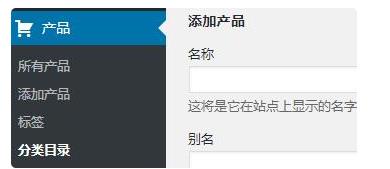
这种方法前端调用的话只需要创建:archive-product.php 模板即可,这个模板用于分类列表页的模板调用,product是我们的post type的名字。创建 single-product.php 模板即可实现分类的文章的详情页的调用。
‘taxonomies’=> array(‘post_tag’)这段代码意思是给自定义post type添加标签页面,如果需要使用WordPress自带的分类标签方法,可以写为注意,’taxonomies’=> array(‘post_tag’, ‘category’)。
在wordpress中也有一种独立的分类法,与文章类型一样,可以使用register_taxonomy()函数来注册分类方法。
猜你喜欢
-
WordPress如何截取文章摘要/文章标题/文章内容字数
2021-04-25 -
is_post_type_archive()函数
2021-04-26 -
get_category_link()函数
2021-04-26 -
导致关键词排名下降的原因
2021-04-24 -
WordPress获取自定义文章类型分类法的所有文章循环
2021-04-25 -
the_posts_pagination()函数
2021-04-26 -
本地https ssl证书生成工具_mkcert 适用于本地开发
2021-04-25 -
wp_get_attachment_image_src()函数
2021-04-26 -
RIpro美化-主题文章页添加FAQ
2021-04-24 -
网站右侧悬浮窗 在线客服简约图标
2021-04-25
-
WordPress制作前端会员用户中心实用功能代码
2021-04-26 -
最新仿知乎问答社区响应式源码带打赏功能,支持文章、话题、第三方登录、在线充值
2021-04-22 -
CrystalSkull 游戏杂志 WordPress 主题
2021-04-22 -
个性博客主题Sakura
2021-04-21 -
WordPress主题开发常用模板名称和头部函数大全
2021-04-26 -
WordPress评论获取QQ头像和昵称教程
2021-04-25 -
给WordPress博客添加返回顶部/底部的教程
2021-04-25 -
WordPress主题常用模板名称、常用标签和函数大全
2021-04-25 -
juicessh是一款针对安卓平台的SSH工具
2021-04-25 -
解决WordPress升级时提示正在执行例行维护,请一分钟后回来
2021-04-26
猜你在找

常见问题FAQ
- 免费下载或者VIP会员专享资源能否直接商用?
- 本站所有资源版权均属于原作者所有,这里所提供资源均只能用于参考学习用,请勿直接商用。若由于商用引起版权纠纷,一切责任均由使用者承担。更多说明请参考 VIP介绍。
- 提示下载完但解压或打开不了?
- 找不到素材资源介绍文章里的示例图片?
- 大资源

- 2021-04-26Hi,初次和大家见面了,请多关照!
